SAP BTP CI/CPI

SAP BTP CPI (Cloud Platform Integration), part of the SAP Integration Suite, enables seamless data and process integration across cloud and on-premise applications. This course provides a comprehensive overview and hands-on experience in using SAP BTP CPI to build, manage, and monitor integration scenarios. Whether you’re a beginner or looking to deepen your expertise, this course is designed to take your integration skills to the next level.

Upcoming Batches

Program Induction

Jaunary-28th

08:30 AM to 11:30 AM (IST)

SAT & SUN (12 WEEKS) Weekend Batch

Regular Classes

Jaunary-30th

07:00 AM to 09:00 AM (IST)

MON – FRI (75 DAYS) Weekdays Batch

Training Highlights

Expert-Led Training

Instructor-led training by industry experts

Hands-on Labs

100% practical, hands-on sessions

Live Projects

Real-time project implementation

Flexible Learning

Flexible Scheduling – Weekday and Weekend Batches

Certification Assistance

Certification assistance and mock tests

Placement Support

Resume preparation and interview guidance

Admission Closes on 15th Mar

Days
Hours
Minutes
Seconds

Corporate Training

Enterprise training for teams

Fast-track Your Career

Emax Technologies empowers learners with industry-relevant skills, leading to career advancements, better job opportunities, and higher salary growth.

Learner’s achievements

Maximum salary hike

150%

Average salary hike

70%

Hiring partners

2900+

Our Alumni In Top Companies

Best SAP BTP CPI Course Training in Hyderabad

SAP BTP CPI is a cloud-based middleware solution that connects different systems in real-time, ensuring smooth data exchange between SAP and non-SAP applications. It plays a vital role in hybrid system landscapes by enabling APIs, pre-packaged content, and simplified integration flows.

Key Features

SAP BTP CI/CPI Training Advantage

Gain a competitive edge with the SAP BTP CI/CPI training program. Master core and advanced concepts in cloud-based integration, focusing on SAP Business Technology Platform (BTP) and Cloud Integration (CPI). Explore real-time integration scenarios and leverage SAP best practices to connect cloud and on-premise applications seamlessly. This hands-on training empowers you to design, implement, and manage end-to-end integration flows, enabling smarter, more efficient business processes and driving digital transformation across the enterprise.

Powered by Emax Technologies

16+ Skills Covered

2 Tools Covered

Industry Projects

Project 1

Personal Expense Tracker

Develop a personal expense tracker with categorized expenses, monthly budgets, and file handling for data storage. A menu-driven interface enhances usability.
Project 1

Personal Expense Tracker

Develop a personal expense tracker with categorized expenses, monthly budgets, and file handling for data storage. A menu-driven interface enhances usability.
Project 1

Personal Expense Tracker

Develop a personal expense tracker with categorized expenses, monthly budgets, and file handling for data storage. A menu-driven interface enhances usability.

An Immersive Learning Experience

Peer to Peer Engagement

Get the real classroom experience. Interact with learners and engage with mentors in real-time via Slack.

Flexi Learn

Missed a class? Access recordings to always maintain learning progress and keep up with your cohort.

Mentoring Session(s)

Expert guidance sessions from mentors for doubt clarifications, project assistance, and learning support.

Learning Support

Get a dedicated Cohort Manager for all your queries and help you succeed at every learning step.

Applied SAP EWM S/4 HANA Training Course Overview

This Applied Generative AI course equips you to develop AI-powered applications using industry-relevant tools and frameworks. Master key concepts like prompt engineering, GANs, VAEs, and LLM architectures while exploring advanced topics, including agentic AI, LLM fine-tuning, RAG, and AI governance for practical, real-world deployments.

Course Content

  1. Types of services offered by SAP Cloud Platform
  2. Basic Understating of SAP Cloud Platform Cockpit
  3.  What is IPass
  4. SAP Cloud Integration Capabilities
  5. SAP CPI Architecture
  6. Overview of SAP CPI Web UI (Discover, Design, Monitor)

● Introduction of Prepackaged Content provided by SAP
● Consuming Prepackaged Content
● Creating your own content Package
● Creating and running custom IFlow
● Creating one Inbound and outbound Integration flows

● Register – SAP ID Service
● Signup SAP Cloud Platform Cockpit
● Sub Account Creation
● Subscribing to Integration suite
● Provisioning the Integration suite
● Adding user roles for accessing CPI applications.
● Creating Service Instance

● Use of an Integration Flow Simulation
● Benefits of Simulation
● Functionalities of Simulation
● Configure Simulation

● Monitor Message Operations
● Manage integration content
● Security Material Manage
● Payload monitoring (Persist)
● Trace Function
● Number Range
● Connectivity Test
● Custom Headers Creation in MPL

● HTTP Adapter
● HTTPS Adapter(CSRF)
● ODATA Adapter
● SOAP Adapter
● Mail Adapter
● SFTP Adapter
● Process Direct Adapter
● Open Connector
● JMS
● Kafka
● JDBC
● AMQP
● Data Store

● Transport level Security Options (TLS)
● Message-level Security Options (MLS)
● Certificate based Communication
● Creating User Credentials

● Participant→ Receiver, Sender
● Process→ Exception Sub process, Integration process, Local Integration
Process
● Events→ End Event, End Message, Error End Event, Error Start Event,
Escalation End Event, Start Event, Start Message, Terminate Message,
Timer
● Connectors
● Delete
● Transformation→ Message Mapping (Graphical Mapping), XSLT
Mapping, Content Modifier, Filter, Converters, XML Modifier.
● Script → Groovy Script, Java Script
● Call→ Looping Process Call, Process Call, Content Enricher, Request
Reply and Send, Idempotent Process Call
● Routing→ Aggregator, Gather, Join, Router
● Splitter→GeneralSplitter,IteratingSplitter,TarSplitter,ZipSplitter,IDoc
Splitter
● Multicast → Parallel Multicast , Sequential Multicast
● Persistence→ Write Variable, Data Store Operations like Write, Select,
Get, Delete, Persist
● Validators→ XML Validator


● Basics of Groovy Script
● Writing Script for accessing Body, Header and Exchange Properties.
● Externalisation of parameters.

● HTTPS →Mail
● HTTPS→ HTTP
● SFTP→ Mail
● SOAP →Mail
● SOAP →SOAP
● HTTPS →Process Direct
● HTTP→ OData
● HTTP → Event Mesh
● Value Mapping
● Overview of adapters configurations Success Factors- Concepts and
Configurations (System connectivity is not possible)
● Ariba – Concepts and Configurations (System connectivity is not possible)
● IDoc – Concepts and Configurations (System connectivity is not possible)
● CC setup
● Event Mesh
● CSRF Auth
● OAuth Auth
● PGP
● Integration Advisor
● Renaming the Iflow
● Message Status in CPI
● Unlock Designtime Artifacts

● Different types of projects in SAP CPI/CI
● Roles and responsibilities of each type of project
● One end to end Project Explanation

● SAP Cloud Platform Cockpit(BTP)
● SAP CPI Web UI
● Postman
● Soap UI
● File Zilla
● Notepad++

Request more information

    Program Trainers

    Srinivas

    Sr. SAP HANA ADMIN Consultant

    16+ Years of Experience

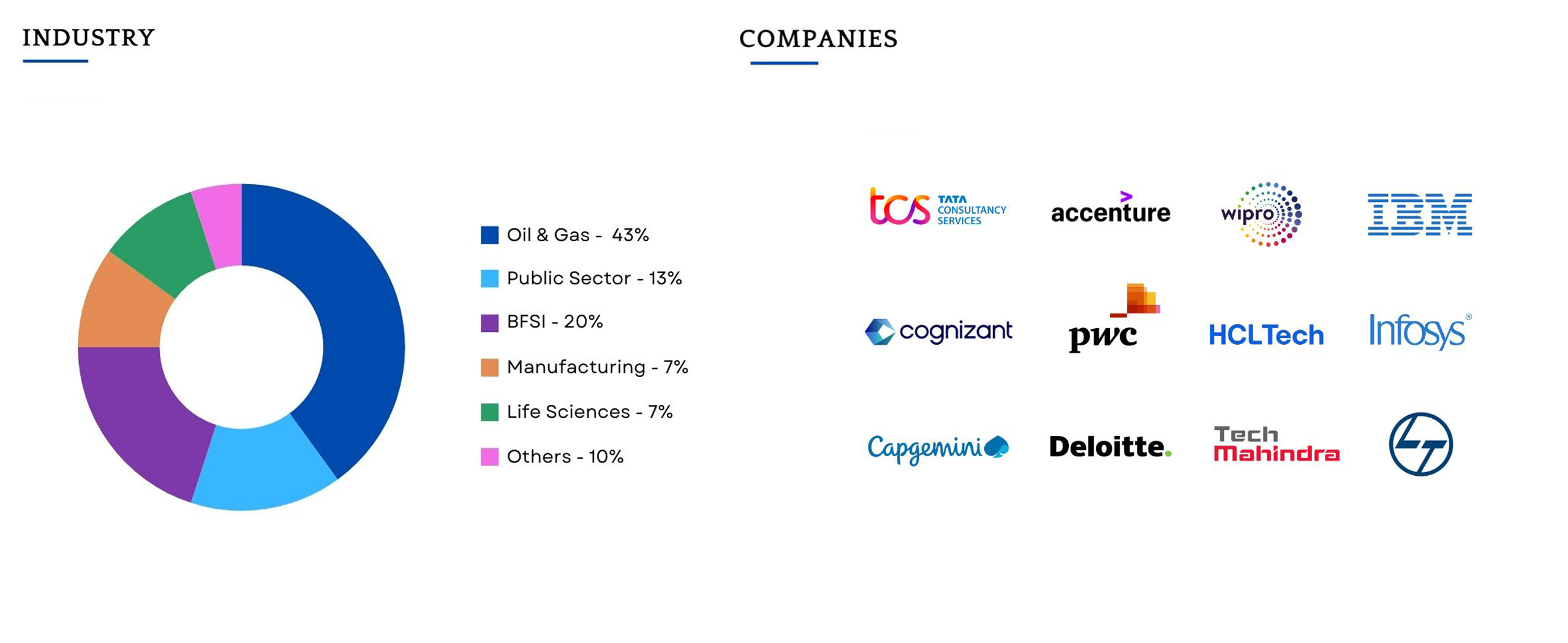
    Companies Hiring

    Batch Profile

    This program caters to working professionals from a variety of industries and backgrounds; the diversity of our students adds richness to class discussions and interactions.

    Testimonial

    The Gen AI module was an eye opener for me. The mentor’s teaching style in the weekend sessions was spot on. While there’s a lot of Gen AI content online, this module stood out for its structured approach and the mentor’s interactive guidance. It made learning about AI easy, even for beginners like me.

    Ashif Khan

    Lead Consultant

    Reviews

    This SAP CPI course was a game-changer! I learned end-to-end integration scenarios and can now design iFlows with confidence.

    Hameed

    I transitioned from PI/PO to SAP CPI seamlessly after this training. The course covered adapters, authentication methods, and troubleshooting deeply.

    Sandeep Kumar

    What I liked most was how current the content was. From API Management to Event Mesh, the trainer made sure we were job-ready.

    Kamal

    Frequently Asked Questions

    You will never miss a lecture at Emax You can choose either of the option: View the recorded session of the class available in your LMS.

    Your access to the Support Team is for lifetime and will be available 24/7. The team will help you in resolving queries, during and after the course.

    Post-enrolment, the LMS access will be instantly provided to you and will be available for lifetime. You will be able to access the complete set of previous class recordings, PPTs, PDFs, assignments. Moreover the access to our 24×7 support team will be granted instantly as well. You can start learning right away.

    Yes, the access to the course material will be available for lifetime once you have enrolled into the course.