










SAP Analytics Cloud

SAP Analytics Cloud is an all-in-one, cloud-based solution from SAP that combines business intelligence (BI), planning, and predictive analytics into a single platform. Designed for enterprise users, SAC empowers organizations to make data-driven decisions with real-time insights, intuitive visualizations, and collaborative planning capabilities—all powered by the speed and flexibility of the cloud.

Upcoming Batches

Program Induction

Jaunary-28th

08:30 AM to 11:30 AM (IST)

SAT & SUN (12 WEEKS) Weekend Batch

Regular Classes

Jaunary-30th

10:00 AM to 11:00 AM (IST)

MON – FRI (75 DAYS) Weekdays Batch

Why Join this Program

Expert Trainers

Instructor-led Live Sessions & Self-Paced Modules

Hands-on Labs

Hands-on Labs & Guided Assignments

Flexible Learning Options

Peer Learning & Expert Mentorship

Career Support

24/7 support and access to recorded sessions

Admission Closes on 15th Mar

Days
Hours
Minutes
Seconds

Corporate Training

Enterprise training for teams

Fast-track Your Career

Emax Technologies empowers learners with industry-relevant skills, leading to career advancements, better job opportunities, and higher salary growth.

Learner’s achievements

Maximum salary hike

150%

Average salary hike

70%

Hiring partners

2900+

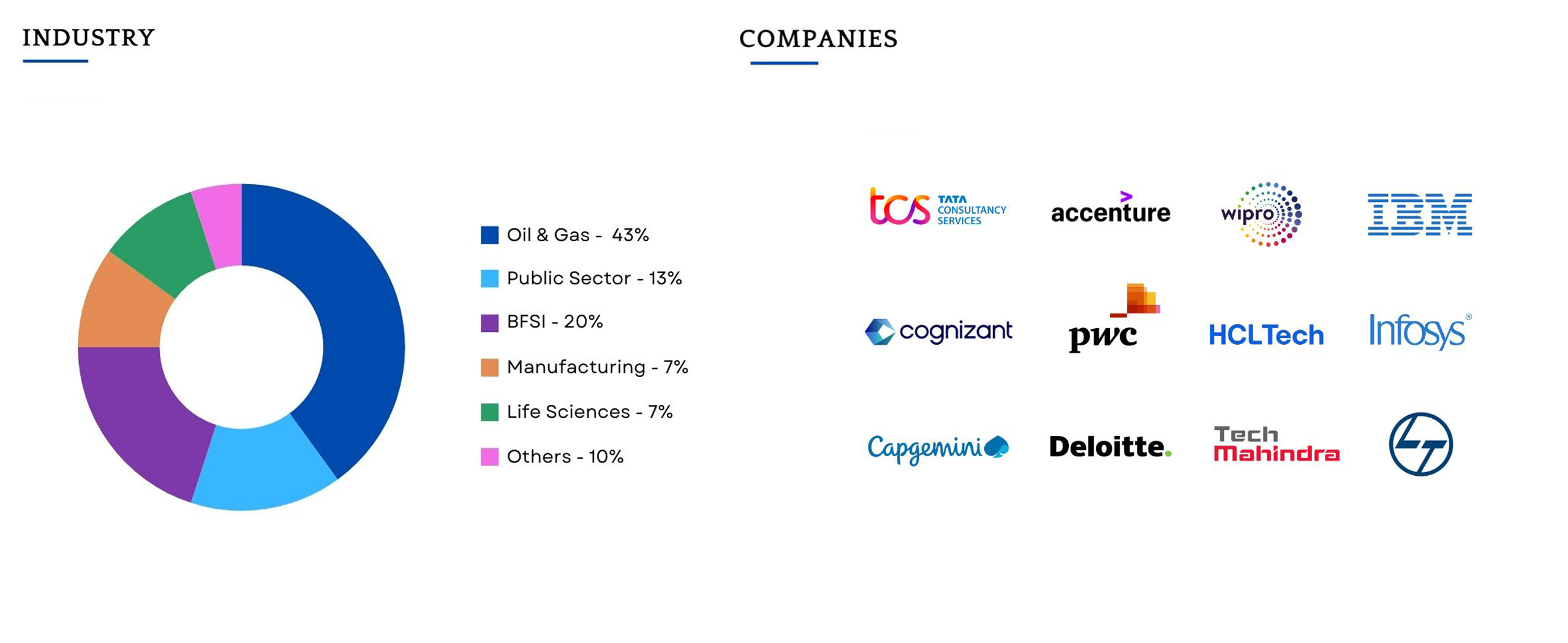
Our Alumni In Top Companies

Best SAP Analytics Cloud Training in Hyderabad

This SAP Analytics Cloud course is designed for data professionals, analysts, and decision-makers who want to master SAC’s capabilities. It offers a hands-on learning experience with real-world use cases and interactive dashboards to develop deep analytical skills within the SAP ecosystem.

Key Features and Advantages of SAP Analytics Cloud

SAP Analytics Cloud Certification Advantage

Elevate your career with the SAP Analytics Cloud certification program from Emax Technologies. This comprehensive training program provides in-depth knowledge of SAP Analytics Cloud’s powerful tools and features. You’ll gain expertise in data modeling, visualization, and reporting, while mastering both core and advanced techniques to drive data-driven insights. Through hands-on learning, you’ll learn how to create dynamic dashboards, integrate data from multiple sources, and leverage predictive analytics to empower smarter business decisions. This program is designed to help you streamline data analysis processes and lead digital transformation in your organization..

Powered by Emax Technologies

7+ Skills Covered

5 Tools Covered

Industry Projects

An Immersive Learning Experience

Peer to Peer Engagement

Get the real classroom experience. Interact with learners and engage with mentors in real-time via Slack.

Flexi Learn

Missed a class? Access recordings to always maintain learning progress and keep up with your cohort.

Mentoring Session(s)

Expert guidance sessions from mentors for doubt clarifications, project assistance, and learning support.

Learning Support

Get a dedicated Cohort Manager for all your queries and help you succeed at every learning step.

Orchestration Training Course Overview

Course Content

  1. SAP Analytics Cloud Architecture Overview
  2. SAC vs other BI tools
  3. Benefits & core functionalities of SAC
  4. Cloud vs On-Premise vs Hybrid
  5. SAP Analytic Cloud Client tools and Importance
  1. Overview of Connections
  2. Live Connections
  3. Import Connections
  4. Connecting and accessing Flat file data
  5. Connecting and accessing Cloud applications
  6. Connecting and accessing Cloud databases
  7. Connecting and accessing SAP-HANA
  8. Connecting and accessing Odata services
  1. What is MODEL
  2. Components of MODEL
  3. Working with Dimension and Classification
  4. Configuring Geo-Dimension
  5. Working with Measures
  6. Working with Transformations
  7. Working with Variables
  8. Data Blending
  1. Desinging SAC Stories
  2. Working with Custom Templates
  3. Working with Standard Templates
  4. Working with Canvas-Responsive & Grid modes
  5. Working with Designer(Builder panel , Styling Panel)
  6. Filters in SAC
  7. Query level filters
  8. Story level filters
  9. Page level filters
  10. Widget level filters
  11. Advanced Filters
  12. Linked Analysis
  13. Hyperlinking
  14. Conditional Formatting
  15. Customizing Measures
  16. Customizing Dimensions
  17. Data blending
  18. Working with Chart widget
  19. Working with Table widget
  20. Working with Geo Map widget
  21. R language basics
  22. Generating R based Stories
  1. What is Augmented Analytics
  2. Smart Search
  3. Smart Discovery
  4. Smart Insights
  1. What is SAP Analytics Designer
  2. Difference between SAC Stories vs SAP Analytics Designer
  3. Analytics Designer overview and walkthrough
  4. Outline,Designer,Error & reference panels
  5. Design mode vs Run mode vs View mode
  6. Desingning basic Analytic application
  7. working with Container widgets
  8. Implementing filters
  9. working with Drop-down,Radibutton,Checkbox componets
  10. working with script variables
  11. working with script objects
  12. Configuring and implementing Dynamic Visibility
  13. Working with Loop functions and Conditional Statements
  14. Implementing Hyperlinking and Explorer option
  1. Predictive scenario overview
  2. SAC Stories vs SAC Applications vs SAC Predictive
  3. Working with Datasets,Variables
  4. Implementing Classification Precitive Model
  5. Implementing Regression Predictive Model
  6. Implementing Timeseries Predictive Model
  7. Generating predictive stories
  1. SAC Architecture Overview
  2. Working with Roles(Standard vs Custom)
  3. Defining Team(s)
  4. Defining User(s)
  5. Working with dataloading and scheduling
  6. SAP Cloud connector
  7. SAP Analyics Cloud Agent
  8. SAC Lifecycle management/Transports
  1. SAC Roadmaps(Current vs Future)
  2. SAC Project Implementation landscapes
  3. SAC Certification Overview
  4. ECC/BW/BO/S4-HANA/HANA-> SAC Migration Strategy
  1. SAC Planning Overview
  2. Building a Planning model
  3. Currency Table Configuration
  4. Working with Value Driver Tree
  5. Working with Data actions
  6. Working with Data actions
  7. Configuring allocations
  8. Working with Distributions
  9. Predictive forecasting implementation
  10. Generating Stories using planning models
  11. Generating analytic applications using planning models

Request more information

    Program Trainers

    Sasank raj

    Sr. SAP PI/PO Consultant

    18+ Years of Experience

    Companies Hiring

    Batch Profile

    This program caters to working professionals from a variety of industries and backgrounds; the diversity of our students adds richness to class discussions and interactions.

    Testimonial

    The Gen AI module was an eye opener for me. The mentor’s teaching style in the weekend sessions was spot on. While there’s a lot of Gen AI content online, this module stood out for its structured approach and the mentor’s interactive guidance. It made learning about AI easy, even for beginners like me.

    Ashif Khan

    Lead Consultant

    Reviews

    Excellent training experience from EMAX Technologies. I took the SAP PI/PO and it was a great experience . I liked trainer sessions as he was more focused on practical rather than theory and helped answer all the queries during the sessions. . Support staff is excellent and very professional, the amount of time they spend with each customer is really appreciated. Keep up the great work!..Great work done by guys like U………!!!!!!!!!!!!!!!!


    Sripal

    SAP PI/PO training is excellent. Classes were well organized and hands-on. Trainer knew their subject matter, and patient.

    Madhusudhan

    Undergone SAP PI training. Course content is covered properly and had a good hands on. (PI require lot of hands on). Good support from staff. Overall very satisfied with faculty, staff, lab etc., PI Faculty

    Raviteja

    Frequently Asked Questions

    You will never miss a lecture at Emax You can choose either of the option: View the recorded session of the class available in your LMS.

    Your access to the Support Team is for lifetime and will be available 24/7. The team will help you in resolving queries, during and after the course.

    Post-enrolment, the LMS access will be instantly provided to you and will be available for lifetime. You will be able to access the complete set of previous class recordings, PPTs, PDFs, assignments. Moreover the access to our 24×7 support team will be granted instantly as well. You can start learning right away.

    Yes, the access to the course material will be available for lifetime once you have enrolled into the course.