
FICO Training

SAP (Systems, Applications, and Products in Data Processing) is a leading enterprise resource planning (ERP) software that helps businesses manage their operations efficiently. It integrates various business functions such as finance, supply chain, human resources, and more, enabling organizations to achieve better decision-making and operational excellence.

Upcoming Batches

Program Induction

Jaunary-28th

08:30 AM to 11:30 AM (IST)

SAT & SUN (12 WEEKS) Weekend Batch

Regular Classes

Jaunary-30th

07:00 AM to 09:00 AM (IST)

MON – FRI (75 DAYS) Weekdays Batch

Training Highlights

Expert-Led Training

Learn from industry professionals with real-world SAP experience.

Hands-on Labs

Work on live projects and real-time case studies.

Live Projects

Work on real-time SAP HANA administration projects.

Flexible Learning

Online and classroom training options available.

Certification Assistance

Get guidance for SAP FICO certification exams.

Placement Support

Resume building, interview preparation, and career assistance.

Admission Closes on 15th Mar

Days
Hours
Minutes
Seconds

Corporate Training

Enterprise training for teams

Fast-track Your Career

Emax Technologies empowers learners with industry-relevant skills, leading to career advancements, better job opportunities, and higher salary growth.

Learner’s achievements

Maximum salary hike

150%

Average salary hike

70%

Hiring partners

2900+

Our Alumni In Top Companies

Best SAP FICO Training in Hyderabad

Our SAP FICO training course is designed to provide comprehensive knowledge of financial
accounting and controlling within the SAP ERP system. Whether you are a beginner or an experienced professional, this course will help you gain in-depth expertise in SAP FICO and
prepare you for a successful career in finance and accounting.

Key Features

SAP FICO S/4HANA Training Advantage

Gain a competitive edge with the SAP FICO S/4HANA training program. Master core and advanced financial accounting and controlling concepts tailored for the S/4HANA environment. Explore real-time financial scenarios and leverage SAP best practices to streamline financial operations, ensure regulatory compliance, and improve reporting accuracy. This hands-on training empowers you to manage end-to-end financial processes, enabling strategic decision-making and driving digital transformation in modern enterprise finance.
Powered by Emax Technologies

5+ Skills Covered

7 Tools Covered

Industry Projects

Project 1

Personal Expense Tracker

Develop a personal expense tracker with categorized expenses, monthly budgets, and file handling for data storage. A menu-driven interface enhances usability.
Project 1

Personal Expense Tracker

Develop a personal expense tracker with categorized expenses, monthly budgets, and file handling for data storage. A menu-driven interface enhances usability.
Project 1

Personal Expense Tracker

Develop a personal expense tracker with categorized expenses, monthly budgets, and file handling for data storage. A menu-driven interface enhances usability.

An Immersive Learning Experience

Peer to Peer Engagement

Get the real classroom experience. Interact with learners and engage with mentors in real-time via Slack.

Flexi Learn

Missed a class? Access recordings to always maintain learning progress and keep up with your cohort.

Mentoring Session(s)

Expert guidance sessions from mentors for doubt clarifications, project assistance, and learning support.

Learning Support

Get a dedicated Cohort Manager for all your queries and help you succeed at every learning step.

Applied UI5/FIORI Training Course Overview

This Applied Generative AI course equips you to develop AI-powered applications using industry-relevant tools and frameworks. Master key concepts like prompt engineering, GANs, VAEs, and LLM architectures while exploring advanced topics, including agentic AI, LLM fine-tuning, RAG, and AI governance for practical, real-world deployments.

Course Content

  1. Overview of ERP?
  2. Advantages of SAP over other ERP Packages?
  3. Why we need ERP?
  4. History& Features of SAP
  5. Advantage of SAP over another ERP package
  6. Introduction to SAP & R/3 Architecture
  7. Induction to HANA System
  8. ECC to HANA changes.
  9. Induction to S/4 HANA and Simple Finance
  10. S/4 HANA Benefits.
  11. SAP- System-Landscape
  12. Induction of SAP Domains (Functional, Technical and Security)
  13. Overview of Remaining Modules (Fun: MM, SD, PP, HR, FM etc…,Tec: ABAP
    and Security: BASIS)
  14. Fundamentals of Business Accounts (All Debit and Credit accounting entries with Profit and Loss Statement and Balance Sheet Overview.
  1. What is FI/CO
  2. Sub Modules in FI/CO
  3. Introduction to G/L, (New G/L), A/P, A/R, AA, Bank Accounting and Taxation.
  4. Introduction to CEA, CCA, EC, PCA, CO-PC, CO-PA.
  5. Concepts of integration with MM & SD
  6. Introduction of Month-end Closing & Year-end Closing
  1. Defining Company
  2. Configuring Company Code
  3. Defining Business Area
  4. Maintaining Consolidation Business Area
  5. Defining Credit Control Area
  6. Defining Financial Management Area
  7. Define Functional Area
  8. Define Segment
  9. Assigning Company Code to Company
  10. Assigning Company Code to Credit Control Area
  11. Assigning Business Area to Consolidation Business Area
  12. Assigning Company Code Financial Management Area
  1. Chart of Accounts- Types of COA
  2. Fiscal Year Variant- Types of Fiscal Years
  3. Posting period Variant
  4. Open and Close Posting Periods
  5. Multiple currencies & Exchange Rate Maintenance
  6. Field Status Variants & Groups
  7. Define posting keys
  8. Defining Tolerance Groups For GL & Employees
  9. Other Aspects of Global Parameters
  1. Introduction to multiple Ledgers for local GAAP, IFRS & US GAAP
  2. Define & Activate New G/L
  3. Activation & Specification of Additional Ledgers
  4. Define Currency for Additional Ledgers
  5. Define Document Splitting for G/L Accounting
  6. Active Document Splitting
  7. Define Document types for Entry View
  8. Create G/L Accounts
  9. Documents in G/L-Ledger & Ledger Group , Foreign Currency , Special Periods
  10. Documents in G/L Park & Post , Hold, Recurring, Account Assignment Types etc,
  11. Reversal Document
  12. Foreign Currency Valuation
  13. Bank Interest Calculation
  14. G/L automatic Clearing Maintenance
  15. G/L Reports
  16. Transfer Balance & Carry Forward (Balance Sheet & P&L items)
  17. G/L Reports
  18. Finance Statement version
  1. Vendor and Customer account group
  2. Documents types for customer and vendors
  3. Number Range assignment for Account group
  4. Reconciliation Accounts for customers and Vendor Master Data
  5. Customer and Vendor Master Data
  6. Special GL transaction
  7. Automatic determination of G/L Accounts for taxes, Foreign exchange(Realized
    and un Realized accounts)
  8. Terms of payment
  9. House banks
  10. Check and transfer method of payment through banks
  11. Payment methods
  12. Automatic Payment Program
  13. Manual& Electronic Bank Statement
  14. Dunning Procedure
  15. Down Payments, Bills of Exchange and Guarantees
  16. Tax Calculation Procedure
  17. Taxes-Service tax with GTA and Withholding taxes(TDS&TCS)
  18. Customer and Vendor Reports
  1. FI-MM integration (Conf. from MM to attain PO, GR and IR)
  2. Accounts Assignment Categories in PO and business process to be used with
    different Account Assignment Categories
  3. Valuation area, Valuation class and its importance in Material Master
  4. Accounting aspects from Material Master
  5. Material Movement Types
  6. OBYC and G/L Account Assignments from MM process
  1. FI-SD Automatic Accounts determination
  2. Revenue Reorganization Process in FI and SD Integration
  3. FI+MM Integration including Excise Duty, VAT, CST
  4. Procurement of Direct Materials
  5. Procurement of Indirect Materials
  6. Procurement of Assets
  7. Procurement of services
  8. FI+SD Integration including Excise Duty, VAT, CST
  9. Sale of goods including Trading Goods & Finished Goods
  10. Service sales
  11. Excise utilization
  12. Taxation with GST
  1. Chart of Depreciation
  2. Define 0% tax Codes for Asset Accounting
  3. Asset Classes and Account determination of Asset Classes
  4. Depreciation Areas- Companies Act, IT ACT, IFRS & US GAAP
  5. Screen Layout Rules and Number Range Assignments
  6. Depreciation Areas for Parallel Currencies
  7. Group Assets
  8. Depreciation Keys
  9. Asset Master data (Main and Sub Assets)
  10. Overview of Revolution of Assets
  11. Introduction to Inflation Accounting
  12. Asset Acquisition (Direct and AuC)
  13. Running Depreciation
  14. Asset retirement (Scrapping, with Revenue with Customer and without Customer)
  15. Inter and Intra Asset Transfers
  16. Asset Reports/ With Different variants and Asset explorer
  17. Strategy on data Migration related to Assets (Legacy Assets- upload process)
  18. Asset procurement with MM +GL+AA Integration
  19. Asset Sale Process with SD +GL+AA Integration
  1. Define controlling area
  2. Maintaining control areas settings
  3. Importance of Different Fields in controlling Area
  4. Assignment of Controlling area to Company Codes
  5. Maintaining number ranges for controlling documents
  6. Maintain versions
  7. Activate components in controlling Area
  1. Primary cost and secondary cost Elements
  2. Cost Element categories
  3. Cost Element groups
  4. Cost element report
  1. Cost Center Hierarchy
  2. Cost Center Groups
  3. Cost Center Categories
  4. Cost Center Mater
  5. Activity Type
  6. Statistical Key Figures
  7. Reposting, Distribution and Assessment
  8. Activity type categories
  9. Planning and Budgeting of Cost Elements
  10. Define Planner Profile, Versions for Planner Profile
  11. Planning VS Budgeting of Cost centers
  12. Cost Center Reports
  1. Order Management in Controlling Area
  2. Define and Assign number ranges to Order Groups
  3. Types of Orders
  4. Model Orders
  5. AuC (Assets) process with Internal Order (Real)
  6. Investment Management Integration with Internal Orders
  7. Month end and final Settlements of Internal Orders
  8. Information System (Reports) for Internal Order
  1. Configuration of product costing
  2. Maintain overhead cost elements
  3. Maintain overhead keys
  4. Define cost component structure
  5. Maintain Overhead cost Elements
  6. Define Costing Sheets
  7. Define Overhead Keys and Groups
  8. Define Cost Component Structure
  9. Variance Calculation
  10. Work in Progress
  11. Settlement
  12. Variance Calculation
  13. Work In Progress
  14. Settlement
  15. Product Cost by Sales
  16. Result Analysis
  17. Settlement
  18. Product Costing by Planning
  19. Product Costing by Order
  20. Product Costing by Period
  21. Product Costing by Sales Order with MM,SD,PP and COPA Integration
  22. Define and Activate Material Ledger
  23. Assign Currency types to Material Ledger
  24. Dynamic Price Change in ML
  25. Other Aspects of ML
  26. Material Costing
  1. Define Operating Concern
  2. Define Characteristics and Value fields
  3. Define Profitability Segment Characteristics
  4. Define Characteristic Hierarchy and Derivation
  5. Maintenance and Assignment of Value fields
  6. Transfer of Billing Documents to COPA
  7. Automatic Account Assignment
  8. Maintain PA Transfer structure for Direct FI Postings
  9. Information System in COPA
  1. Maintain profit Center and Activation of Company Codes in profit center
  2. Control Parameters for Actual data
  3. Plan versions
  4. Profit Center Standard Hierarchy
  5. Profit Center Groups
  6. Transfer pricing Process with profit Center
  7. Maintain planner profiles
  8. Distribution & Assessment
  9. Automatic Account Assignment for Revenue Elements
  1. Preparation of Functional specs for Z reports
  2. LSMW
  3. Report Painter
  4. Resolving tickets with Real time scenarios
  5. Implementation, Support and maintenance process
  6. Complete Real Time Projects in ECC and S/4 HANA
  1. Overview Discreate and Repetative Manufacturing
  2. Product Costing
  3. Product cost by order (Discrete)- At Product Level
  4. Product cost by Period (Repetitive) with WIP
  5. Product cost by Period (Repetitive) without WIP
  6. Production against SO with Valuation (Not a Cost Object)- MTO
  7. Production against SO with Valuation (Cost Object)- MTO
  8. Production against SO with Valuation – MTO
  1. Calculation of plan activity Prices, Primary Cost Component Split
  2. Scenario Based Product cost estimates- Auxilary Cost Component Split
  3. Overhead Key and Group
  4. Template Allocation
  5. Origin Group Usage
  6. Additive cost Estimate
  7. Mixed cost Estimate
  8. By Product costing
  9. Split Valuation+
  10. Sub-Contracting
  11. Stock Transfer
  12. Unit Costing
  13. Scrap
  1. Multiple Currencies
  2. Actual Cost
  3. Activate Business Functions of HANA
  4. Basic Settings for company Code
  5. Define Chart of Accounts (With HANA Changes)
  6. Open and Close posting periods
  7. Enter Global Parameters
  8. Accounting Principles (All Countries GAAPs)
  9. Assign Accounting Principles to Ledger Group
  10. Define Controlling Area basic settings (With HANA Changes)
  11. Ledgers of S/4 HANA
  12. Integration of controlling with Financial accounting
  13. Execute Consistency Check of General Ledger Settings
  14. Master Records
  15. G/L Master creation
  16. Regenerate CDS Views and Field Mapping
  17. Display application log for Regenerate CDS view
  18. Postings
  19. Edit coding Block
  20. Foreign Currency Valuation
  21. Error Correction and Suspense Accounting
  22. Business Partner Creation
  1. Book Depreciation-USD- Group Valuation
  2. Local GAAP/Local Currency–USD- Group Valuation
  3. Tax Accounting / Tax Currency–USD- Group Valuation
  4. Book Depreciation-GBP-Hard Currency Valuation
  5. Local GAAP/Local Currency-GBP- Group Valuation
  6. Tax Accounting / Tax Currency-GBP- Group Valuation
  7. Specify Transfer of APC value
  8. Specify Transfer of Depreciation Terms
  9. Specify the Use of Parallel Currencies
  10. Assign Input Tax Indicator for Non-Taxable Acquisitions
  11. Assign Chart of Depreciation to Company Code
  12. Specify Account Determination
  13. Create Screen Layout Rules
  14. Define Number range Intervals for Asset master records
  15. Define Asset Class
  16. Define Technical Clearing Account for Integrated Asset Acquisition
  17. Define Different Technical Clearing Account for Required Fie
  18. Specify Alternative Document Type for Accounts-Principle-Specif
  19. Define Separate Document Types by Company Code
  20. Define Depreciation Area for Quantity Update
  21. Allow Differing Variants for Depreciation Areas with G/L Int
  22. Valuation Methods:-
  23. Post Net Book Value Instead of Gain/Loss
  24. Activate New Asset Accounting (New Customers)

Contact Us

+91-9948444808

Request more information

    Program Trainers

    Srinivas

    Sr. SAP HANA ADMIN Consultant

    16+ Years of Experience

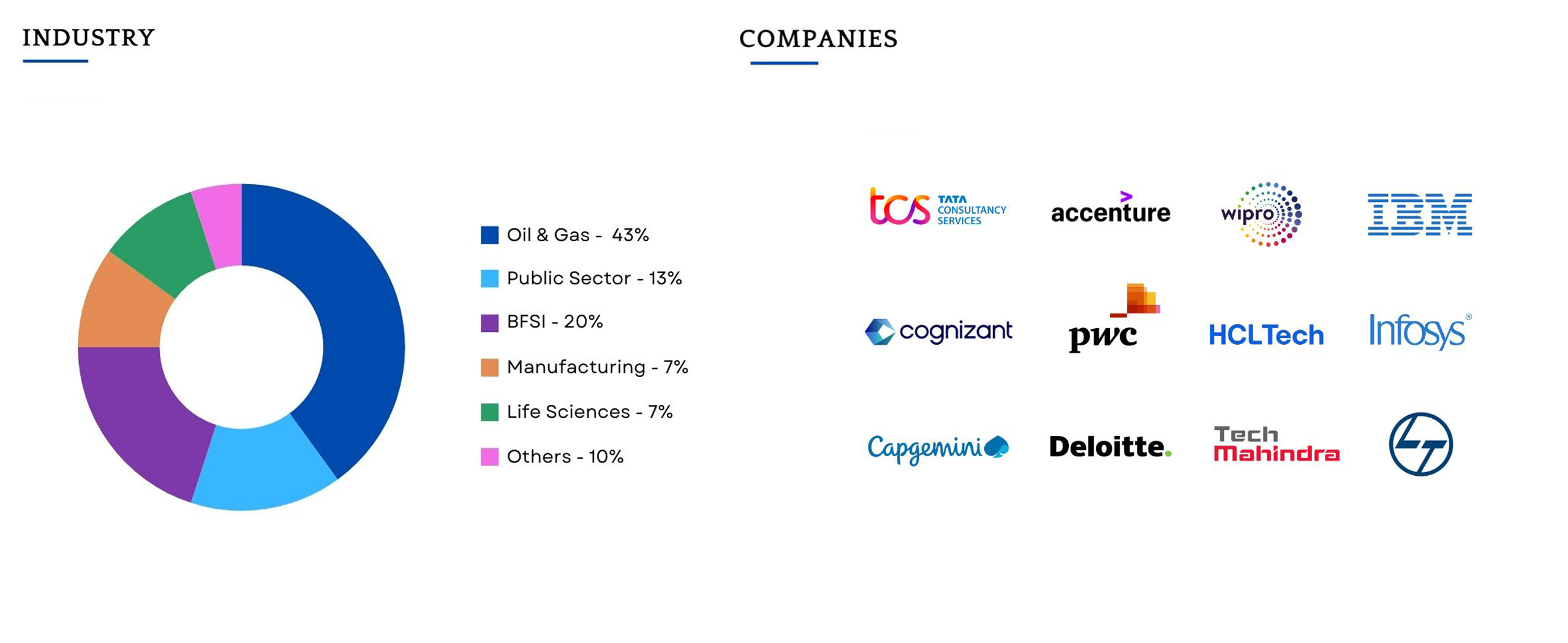
    Companies Hiring

    Batch Profile

    This program caters to working professionals from a variety of industries and backgrounds; the diversity of our students adds richness to class discussions and interactions.
    Testimonial

    The Gen AI module was an eye opener for me. The mentor’s teaching style in the weekend sessions was spot on. While there’s a lot of Gen AI content online, this module stood out for its structured approach and the mentor’s interactive guidance. It made learning about AI easy, even for beginners like me.

    Ashif Khan

    Lead Consultant

    Reviews

    The SAP FICO training was a game-changer for my career. The course was well-structured, and the trainer made complex topics easy to understand. I landed a job within a month of completing the course!

    Ravi Teja

    As someone from a finance background, I found this SAP FICO training extremely valuable. The real-time project exposure and hands-on practice sessions helped me build confidence in using the system professionally.

    Sonia Reddy Financial Analyst

    The best part about this FICO training was the live examples and case studies. It felt like working in a real SAP environment. Highly recommend it to anyone serious about SAP finance careers.

    Mahesh Kumar SAP FICO Trainee

    Frequently Asked Questions

    You will never miss a lecture at Emax You can choose either of the option: View the recorded session of the class available in your LMS.

    Your access to the Support Team is for lifetime and will be available 24/7. The team will help you in resolving queries, during and after the course.

    Post-enrolment, the LMS access will be instantly provided to you and will be available for lifetime. You will be able to access the complete set of previous class recordings, PPTs, PDFs, assignments. Moreover the access to our 24×7 support team will be granted instantly as well. You can start learning right away.

    Yes, the access to the course material will be available for lifetime once you have enrolled into the course.